
Avoid Regions for Interfaces in Visual Studio

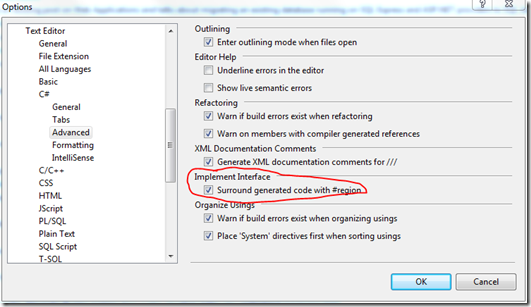
Another quick tip related to the use of regions in your C# code – you can turn off the default behavior of wrapping interface implementations in regions via the options dialog. Simply go to Tools –> Options –> Text Editor –> C# –> Advanced as shown in the screenshot below, and uncheck the “Surround generated code with #region” checkbox.
If you liked this post, consider subscribing to email updates about my new posts, or sharing it on Hacker News.

Keyboard shortcuts

?
Show this help
Esc
Close this help or an open menu
n
Next (newer) post: SELECT from a Stored Procedure
p
Previous (older) post: Silverlight Tools
Tab
Move between links and buttons (Shift+Tab to go back)