
This post is part of the C# Advent Calendar 2024 - check out all of the C# articles from this year!
C# events are a powerful feature of the language, providing a simple mechanism for building publish-subscribe communication patterns. However, when used in ASP.NET Core applications, events can lead to subtle, hard-to-diagnose issues that can harm the reliability and scalability of your application. In this article, I’ll highlight the main issues with using C# events in ASP.NET Core and share better alternatives.
The associated code samples can be found in this GitHub repository: AvoidCSharpEventsAspNetCore
The Appeal of C# Events
At first glance, C# events seem like a natural choice for situations where you want to notify other parts of the application about something that has happened. Here’s a simple example of an event-based system in a hypothetical alarm service:
|
|
In this example, the AlarmService notifies subscribers whenever a new alarm is added. While this works well for small, simple applications, it introduces problems when used in larger or more complex systems, like ASP.NET Core applications.
The Problems with Events in ASP.NET Core
There are several issues with using C# events in ASP.NET Core applications. Let’s look at a few of them just so you have some concrete reasons to avoid them and understand it’s not just because I said so.
Memory Leaks
One of the most common issues with events is that they can lead to memory leaks if you forget to unsubscribe (or you remember but bad things happen and the code that would have cleaned them up doesn’t end up running). In.NET, the event publisher holds a strong reference to the event handler. If a subscriber is not unsubscribed, it cannot be garbage-collected even if it is no longer in use. This is particularly problematic in ASP.NET Core, where transient objects are common. As you may know, in.NET the garbage collector is the thing that makes sure unused memory is reclaimed for the application. If your application continues to create objects that cannot be garbage collected, you will eventually run out of memory and your application will crash.
Example of a Memory Leak:
|
|
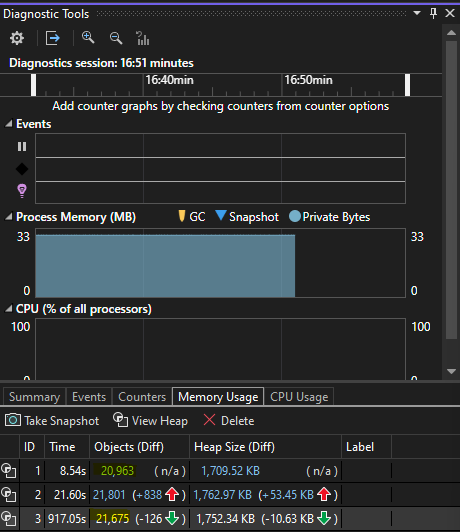
Every time a new LeakyAlarmSubscriber is created, it stays in memory indefinitely because the AlarmService holds a reference to its event handler. You can see this in the following memory snapshots taken with the Visual Studio debugger:
You can also demonstrate the issue using BenchmarkDotNet to measure the memory usage of your application over time. Set up the benchmark:
|
|
Then add a FixedSubscriber that uses IDisposable to unsubscribe from the event:
|
|
It will take a few minutes (be sure to comment out the Console.WriteLine call, too), and then you’ll see the results:
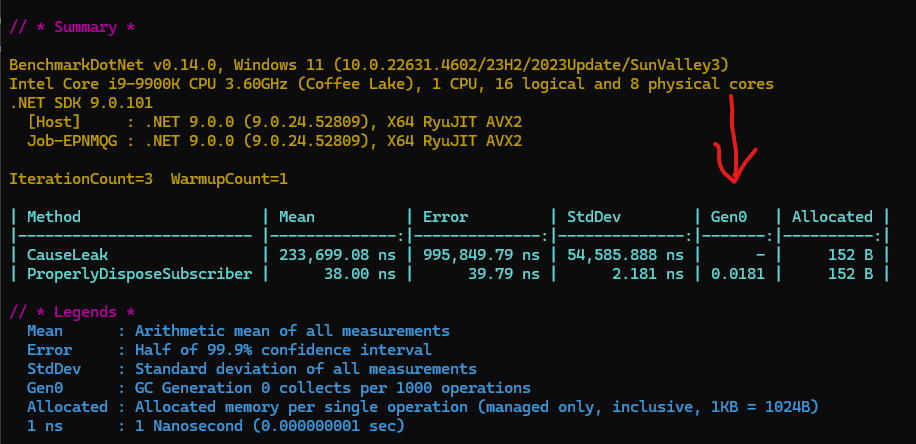
The allocated memory is the same in both cases, but notice that garbage collection is happening in the second case. This is because the FixedSubscriber is properly unsubscribing from the event, allowing the garbage collector to reclaim the memory.
But even if you’re always diligent about unsubscribing from events, there are other issues to consider.
Where’s the increase in RAM over time?
To see the increase in memory usage over time, you can put the leaky code into a big loop like this one:
|
|
Running that yields something like this:
|
|
Thread-Safety Issues
C# events are not thread-safe by default. If multiple threads raise or subscribe to an event at the same time, it can lead to race conditions or even NullReferenceException.
Example of a Potential Race Condition:
|
|
To avoid these issues, you would need to introduce thread-safety mechanisms, such as copying the event delegate to a local variable before invoking it.
Tight Coupling
C# events create tight coupling between the publisher and the subscribers. The publisher directly depends on the existence of the subscribers, making it harder to maintain and test the system. Other patterns can be more flexible because subscribers (handlers) can be instantiated as needed.
Why This Is Problematic:
- The
AlarmServicehas no control over what the subscribers do. - Subscribers may unintentionally introduce performance issues or exceptions that impact the entire system.
Better Alternatives
To avoid these issues, consider the following alternatives to C# events:
Use a Mediator Pattern
The Mediator pattern decouples the publisher and subscribers, making the system more scalable and testable. Libraries like MediatR are great for implementing this pattern in ASP.NET Core. Here’s how you could rewrite the alarm example using MediatR:
|
|
In this example, the AlarmService publishes an AlarmAdded notification using MediatR, and the AlarmHandler subscribes to it. This approach decouples the publisher and subscribers, making the system more maintainable and testable. There’s no direct dependency between the components, so there’s no risk of memory leaks or tight coupling.
Use an Event Aggregator
An Event Aggregator is a centralized hub for managing events and subscribers. This pattern is particularly useful in applications with complex communication requirements.
An example of an Event Aggregator in ASP.NET Core:
|
|
In this example, the EventAggregator acts as a central hub for managing events and subscribers. The AlarmService publishes an Alarm message, and the AlarmSubscriber subscribes to it. This pattern provides a flexible and scalable way to manage communication between components, without the issues associated with C# events or dependency on third-party libraries.
Conclusion
C# events can be a useful tool in small, isolated systems, but they often cause more problems than they solve in modern ASP.NET Core applications. By understanding their limitations and considering alternative approaches, you can build more robust, maintainable systems.