
I’ve written about Enum Alternatives in C#, and a common problem developers encounter when they try to use such an approach is persistence. By default, ORM tools like Entity Framework don’t know what to do with these custom types. However, you can add support to let EF map these types to database columns as you would expect without too much effort. Here’s a quick example you can try yourself with a new MVC 5 project.
Step 1. Create a new Web Application in Visual Studio.
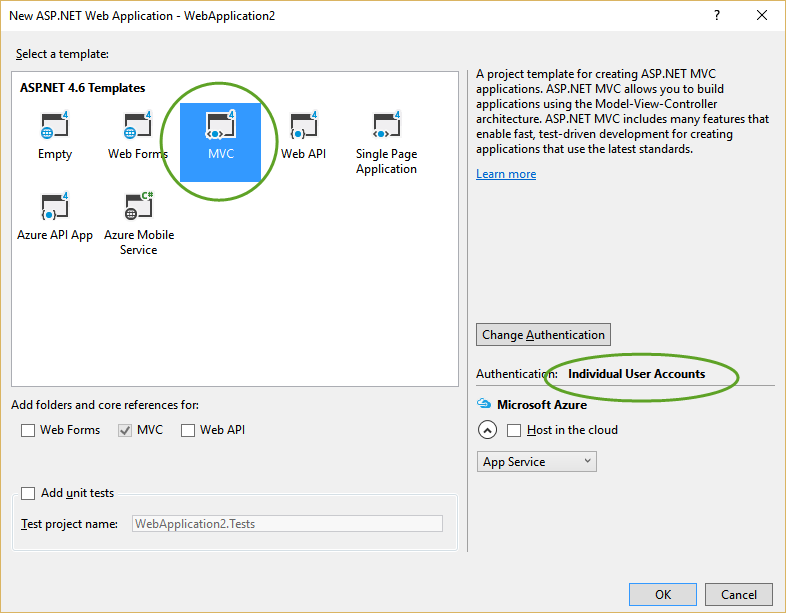
Make sure to specify that you want individual user accounts.
Step 2. In the Models folder, find the ApplicationUser class.
We’re going to give it a new Role property that will use the type-safe enum pattern. Add this property:
|
|
Step 3. Define the Role Class
The Role class is our type-safe enum implementation. It must include whatever value you want persisted in the database to indicate that an ApplicationUser is in this role. This might be an Id property or a Value property, and it could be an int or a string or whatever makes sense for your application and data structure. In this case, it’s going to have a Value property and it’s going to start at 0 to properly emulate an enum.
|
|
Step 4. Map the Property for Entity Framework
Ok, so far, so good. If you try to generate a new schema now using EF migrations, the Role property is likely to be completely ignored. Let’s look at what we need to add to the DbContext to properly map this property:
|
|
This mapping tells EF to map the Role property based on its Value property, and to use a columntype of int. It also tells it to ignore the Name property on Role (by default every property on a complex type is mapped, and until recently, had to be mapped).
With this in place, you can enable migrations and add a new migration:
> Enable-Migrations Checking if the context targets an existing database...
Code First Migrations enabled for project WebApplication2.

> Add-Migration RoleProperty
Scaffolding migration 'RoleProperty'.
Looking at the generated ‘DATESTAMP_RoleProperty.cs’ file, you’ll find a new Role_Value column on AspNetUsers:
|
|
If you want to test that everything works, just create a new user and assign it to a role (or whatever enum you’re using). Then fetch it from persistence and confirm it has the value you expected.
|
|
If you like, you can certainly write integration tests to confirm the same behavior.
This pattern is much more powerful than the standard enum keyword. I use it frequently and I hope you find it helpful.